Category Archives: Site News

New Mobile Layout

I’ve updated the site to a new version of WordPress Mobile Edition, which seems to handle both low-end and high-end phones well enough that I don’t need a separate plugin for iPhone and Android visitors. This should make things a bit cleaner.
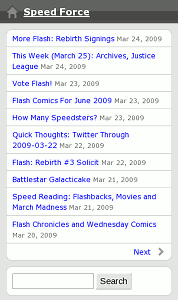
Mobile Site (WordPress Mobile Edition 3.0)

Anyway, if you have a web-capable phone, please give the site another look when you get a chance and let me know whether anything breaks!

In particular, I want to know:

  • What phone are you using?
  • Are you using the built-in web browser or an add-on like Opera Mini?
  • Can you view the site?
  • Does it look like the image above, or just like it does on your computer?
  • Can you make a comment?

If you can’t post a comment, please try one of the following:

  • Bring up the site on your computer to leave the comment.
  • Send me a Twitter direct message to @SpeedForceOrg.
  • Email me at speedforce – [at] – pobox – [dot] – com.

Thanks in advance!

Light Week…then WonderCon

WonderCon 2009This week’s going to be a bit light because I’ll be on vacation. That’s not to say I won’t be around — I’ve pre-written and scheduled a couple of posts, some of the hotels will have wifi, and I’ve got a near-permanent link to the Internet now in the form of a G1 phone — but I’ll be spending a lot of time doing touristy things and hanging out with people instead of spending all day in front of a computer.

Then at the end of the week I’ll be attending WonderCon in San Francisco. Keep an eye on @SpeedForceOrg on Twitter and my Flickr photos, plus I’ll make occasional posts here. My con report(s) will go up at K-Squared Ramblings, with anything Flash-specific here.

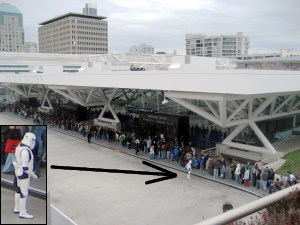
Line at Moscone Center, WonderCon 2008

You can read my write-up of last year’s WonderCon, as well as check out last year’s photos.

Please Check This Site in Your Phone!

A quick request, if I may: If you have a web-capable cell phone, would you please try to view this blog in it and let me know how it appears? I’m testing some plugins that should optimize the page for desktop, low-end mobile, and high-end mobile devices.

Please look at the main page and at least one post, then leave a comment below (still on the phone if you can) with the following:

  • What phone are you using? (RAZR, iPhone, etc. Specific model if you know it)
  • Can you load the site at all? (If not, what error do you get?)
  • Does it look like..
    1. The desktop version of the site (red background, lightning banner, full sidebar, complete posts on main page)
    2. A bare-bones page (plain background, mostly text, headlines only on main page, “Powered by WordPress. WordPress Mobile Edition” listed at the bottom of the page)
    3. A sleeker-looking list (grayish background, each post headline in a white rectangle, calendar image next to each headline, main page has headlines that expand to excerpts, dark red banner across top, “Powered by WordPress with WPtouch” listed in footer)
  • Are you using the built-in web browser, or something you installed (Opera Mini, for example)?
  • Did anything not work?

If you can’t post a comment, please try one of the following:

  • Bring up the site on your computer to leave the comment.
  • Send me a Twitter direct message to @SpeedForceOrg.
  • Email me at speedforce – [at] – pobox – [dot] – com.

I’m mainly trying to make sure that the detection code is working right, since I’ve got 3 different plugins (WPTouch, WordPress Mobile Edition and WP Super Cache) working together to manage it.

Thanks in advance!

We’re Baaack!

I apologize to those who’ve tried to visit the site this weekend and couldn’t see it. Apparently when I upgraded one of my plugins (WP Super-Cache, which normally improves performance on the site), it tried to enable a feature on the server that it didn’t have permission to turn on. Whenever it tried to load a page from the cache, it would run into the permissions problem and show a “500 Internal Server Error” page.

Of course, since I was always logged in when I looked at the site, it never tried to load the page from the cache, so I never saw the error. I even made a few posts.

Reminder to self: When updating plugins, always test the site both while logged in and while not logged in!

Technical details: The .htaccess file in the wp-content/cache folder didn’t have permission to turn on expiration (the error in Apache’s logs was “ExpiresActive not allowed here”). Solution: add “AllowOverride Indexes” to the folder’s area in the server configuration.

Light Blogging Week

Even with Final Crisis #5 coming out this week, it’s going to have to be a light one for blogging. Deadlines at work, so I may be staying late, plus I’m sick. (Great combination, huh?)

If I have time I’ll try to finish one of several half-done posts I’ve been working on. And I’ll check the usual news sites in the evening, though I doubt there will be much in the way of huge Flash news this week.